Posts

Showing posts with the label apt-get update

How To Make A Vault Using Notepad

Image
1. Open Notepad and Copy code given below into it.     cls     @ECHO OFF     title zerocoolz1.blogspot.com     if EXIST "Control Panel.{21EC2020-3AEA-1069-A2DD-08002B30309D}" goto UNLOCK     if NOT EXIST MyFolder goto MDMyFolder     :CONFIRM     echo Are you sure to lock this folder? (Y/N)     set/p "cho=>"     if %cho%==Y goto LOCK     if %cho%==y goto LOCK if %cho%==n goto END if %cho%==N goto END echo Invalid choice. goto CONFIRM :LOCK ren MyFolder "Control Panel.{21EC2020-3AEA-1069-A2DD-08002B30309D}" attrib +h +s "Control Panel.{21EC2020-3AEA-1069-A2DD-08002B30309D}" echo Folder locked goto End :UNLOCK echo Enter password to Unlock Your Secure Folder set/p "pass=>" if NOT %pass%== zerocoolz1 goto FAIL attrib -h -s "Control Panel.{21EC2020-3AEA-1069-A2DD-08002B30309D}" ren "Control Panel.{21EC2020-3AEA-1069-A2DD-08002B30309D}"...
Google Dorks For Hacking CCTV And Security Cameras

Here  is a list of all google dorks you can use for hacking hacking cctv and security cameras     inurl:”CgiStart?page=”     inurl:/view.shtml     intitle:”Live View / – AXIS     inurl:view/view.shtml     inurl:ViewerFrame?Mode=     inurl:ViewerFrame?Mode=Refresh     inurl:axis-cgi/jpg     inurl:axis-cgi/mjpg (motion-JPEG) (disconnected)     inurl:view/indexFrame.shtml     inurl:view/index.shtml     inurl:view/view.shtml     liveapplet     intitle:”live view” intitle:axis     intitle:liveapplet     allintitle:”Network Camera NetworkCamera” (disconnected)     intitle:axis intitle:”video server”     intitle:liveapplet inurl:LvAppl     intitle:”EvoCam” inurl:”webcam.html”     intitl...

How To Solve Error 302 " Permission Denied" In Linux

Image
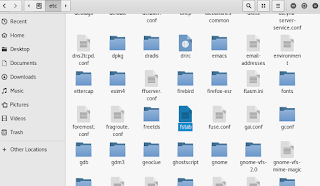
To solve this error  follow the steps given below 1. open file explorer and navigate  to root/etc/fstab 2. Open this file and temporarily delete noexe 4. save this file and reboot your system and you are done now install any   software u want

How To Update Almost All Repositories In Kali Linux

Image
To edit repositories and update/upgrade/install almost all apps in kali linux follow the steps given below 1. open terminal 2. edit source.list          type: gedit /etc/apt/sources.list    and hit enter                                3. now add these line and save ## Source repositories deb-src http://http.kali.org/kali kali main non-free contrib deb-src http://security.kali.org/kali-security kali/updates main contrib non-free deb http://http.kali.org/kali kali-rolling main contrib non-free # For source package access, uncomment the following line deb-src http://http.kali.org/kali kali-rolling main contrib non-free deb http://http.kali.org/ /kali main contrib non-free deb http://http.kali.org/ /wheezy main contrib non-free  4. now open t...